
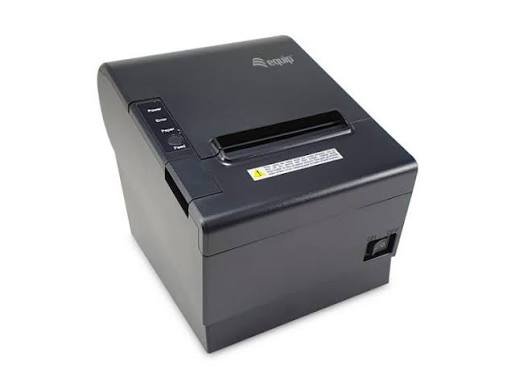
Essential Maintenance Tips to Keep Your Receipt Printer Working Efficiently
Receipt printers are important equipment for businesses that handle frequent customer transactions. Retail stores, restaurants, supermarkets, hotels, and other commercial establishments rely on these devices to generate receipts, payment confirmations, and transaction records quickly. However, continuous operation, dust accumulation, paper residue, and improper handling can gradually affect printing quality and equipment performance.
Regular maintenance helps businesses prevent unexpected breakdowns, reduce repair expenses, and extend the working life of their printing equipment. Whether a business operates a single checkout counter or multiple POS stations, following proper care practices can keep a Receipt Printer functioning efficiently and reliably.
1. Clean the Printhead Regularly
The printhead is one of the most important components of a receipt printer, particularly in thermal models. It generates heat to create text and graphics on specially coated paper. Over time, dust, paper particles, and other contaminants can accumulate on its surface.
A dirty printhead may produce faded text, uneven printing, or blank sections on receipts.
To maintain it properly, switch off the printer and allow the printhead to cool before cleaning. Use a manufacturer-approved cleaning pen or suitable lint-free material with an appropriate cleaning solution. Avoid using sharp objects or excessive pressure, as these can damage the sensitive surface.
Regular cleaning helps maintain consistent print quality and reduces unnecessary wear.
2. Use High-Quality Compatible Paper Rolls
Paper quality directly affects printing performance. Low-quality or incompatible paper can cause feeding problems, unclear printing, and excessive residue inside the printer.
For thermal models, always use paper that meets the manufacturer’s specifications. Check the recommended width, roll diameter, and paper thickness before purchasing replacement supplies.
Businesses should also store thermal paper in a cool, dry location away from direct sunlight, excessive heat, and moisture. Proper storage helps preserve paper quality and prevents premature fading.
Using compatible supplies can improve printing consistency and reduce maintenance requirements.
3. Keep the Paper Compartment Clean
Paper dust and small particles can accumulate inside the printer during regular operation. If these materials are not removed, they may interfere with paper feeding and affect internal components.
Open the paper compartment according to the manufacturer’s instructions and remove loose debris using an appropriate cleaning tool.
Avoid blowing dust directly into the printer, as this can push particles deeper into the mechanism. A soft brush or suitable cleaning equipment can help remove accessible debris safely.
Keeping the paper compartment clean supports smooth feeding and reduces the likelihood of paper jams.
4. Inspect Cables and Connectivity
Modern receipt printers connect to POS systems through USB, Ethernet, Bluetooth, or Wi-Fi. Loose cables, unstable network connections, and damaged adapters can interrupt communication between devices.
Businesses should periodically inspect all physical connections to ensure they are secure and free from visible damage.
For wireless printers, check signal strength and confirm that the device remains connected to the correct network or paired terminal.
If printing interruptions occur frequently, restarting the printer and connected POS equipment may help restore communication. Persistent problems should be investigated through the manufacturer’s troubleshooting instructions.
5. Protect the Printer from Heat, Dust, and Moisture
The operating environment has a significant influence on printer performance and lifespan. Excessive heat can affect electronic components, while moisture and dust may interfere with mechanical and electrical systems.
Place the printer on a stable, clean surface with sufficient ventilation. Avoid positioning it near ovens, heaters, direct sunlight, or areas exposed to liquid spills.
Restaurants and industrial workplaces should take additional precautions because grease, humidity, and airborne particles can accumulate around equipment.
A suitable installation environment helps maintain reliable operation and reduces the risk of environmental damage.
6. Maintain the Automatic Paper Cutter
Many modern thermal receipt printers include an automatic cutter that separates printed receipts from the paper roll. This component experiences repeated mechanical movement during daily operations.
Paper fragments, dust, and improper handling can affect its performance.
Inspect the cutter area periodically and remove accessible paper debris after switching off the printer. Never force the cutting mechanism or attempt to remove obstructions using sharp objects.
If receipts remain partially attached or the cutter becomes stuck repeatedly, professional servicing may be necessary.
7. Update Drivers and Firmware When Necessary
Printer software plays an important role in communication with POS terminals and business applications. Outdated drivers may cause compatibility problems, printing delays, or connection failures.
Businesses should periodically check for compatible driver and firmware updates provided by the manufacturer.
Before installing an update, confirm the printer model and supported operating system. Follow the manufacturer’s instructions carefully and avoid interrupting the update process.
Keeping software current can improve compatibility, address known technical issues, and support more reliable printing operations.
8. Check Printer Settings and Print Quality
Incorrect printer settings can affect receipt appearance and printing performance. For example, unsuitable print density, paper width, or character settings may result in unclear output or unnecessary paper consumption.
Employees should verify that the printer configuration matches the requirements of the POS system.
Perform occasional test prints to check text clarity, alignment, barcode readability, and paper feeding. If the output becomes inconsistent, review the settings before assuming that the hardware is damaged.
Correct configuration helps maintain professional-looking receipts and reduces avoidable printing errors.
9. Avoid Overloading the Printer
Every receipt printer has recommended operating specifications. Using equipment beyond its intended workload can increase component wear and contribute to overheating or mechanical problems.
Businesses with high transaction volumes should select models designed for continuous commercial use.
Allow the equipment to operate within the manufacturer’s recommended temperature and workload limits. If printing demand increases significantly, consider whether the existing printer is still appropriate for the business.
Choosing suitable equipment helps prevent unnecessary strain and supports long-term reliability.
10. Train Employees in Proper Printer Handling
Even well-designed printers can develop problems when employees use them incorrectly. Basic staff training can reduce avoidable damage and improve everyday maintenance practices.
Employees should understand how to:
- Replace paper rolls correctly.
- Recognize common error indicators.
- Clear paper jams safely.
- Clean accessible printer components.
- Check cable and network connections.
- Follow manufacturer troubleshooting instructions.
Establishing simple maintenance responsibilities also helps businesses identify potential issues before they interrupt operations.
Creating a Regular Receipt Printer Maintenance Schedule
A maintenance schedule makes equipment care more consistent and easier to manage.
| Maintenance Task | Suggested Frequency |
|---|---|
| Check paper supply | Daily |
| Inspect cables and connections | Weekly |
| Clean paper compartment | Weekly or as needed |
| Inspect print quality | Weekly |
| Clean printhead | According to manufacturer guidance |
| Check automatic cutter | Periodically |
| Review drivers and firmware | When updates are available |
| Professional inspection | According to usage and manufacturer recommendations |
The appropriate schedule depends on printing volume, operating conditions, and the specific printer model.
Conclusion
Maintaining a receipt printer properly is essential for businesses that depend on reliable POS operations. Regular printhead cleaning, compatible paper selection, dust removal, cable inspection, and correct software configuration can prevent many common performance problems.
Businesses should also protect their equipment from environmental damage, train employees in proper handling, and follow manufacturer maintenance recommendations. With consistent care and timely servicing, receipt printers can deliver clear output, reduce operational interruptions, and support efficient daily transactions over the long term.


