Important Features to Consider When Buying a Thermal Printer
Choosing the right printing equipment is essential for businesses that depend on accurate receipts, product labels, shipping documents, and barcode identification. Thermal printing technology has become a popular choice because it offers fast operation, convenient maintenance, and reliable printing performance across different industries. However, not every printer provides the same capabilities, and selecting an unsuitable model can lead to unnecessary expenses, compatibility problems, and workflow interruptions.
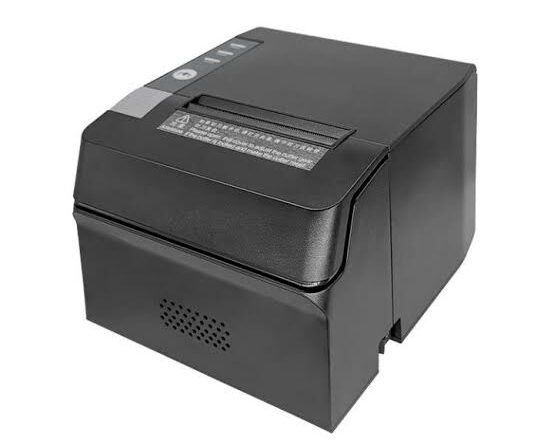
Before purchasing a printer, businesses should evaluate several important specifications, including printing resolution, speed, connectivity, media compatibility, and overall durability. Understanding these features makes it easier to identify a Thermal Printer that matches specific operational requirements and provides long-term value.
1. Printing Technology: Direct Thermal or Thermal Transfer
One of the first features to consider is the printing technology used by the device. Thermal printers generally operate through two primary methods, and each is suitable for different applications.
Direct Thermal Technology
Direct thermal printers use specially coated paper that changes color when exposed to heat from the printhead. This process creates text, graphics, and barcodes without requiring ink cartridges, toner, or ribbons.
Direct thermal technology is commonly used for:
- Retail receipts and transaction records.
- Shipping and delivery labels.
- Queue management tickets.
- Temporary product identification.
- Short-term inventory labels.
This printing method is convenient for businesses that need straightforward printing with fewer consumables. However, direct thermal prints can fade when exposed to excessive heat, sunlight, and friction.
Thermal Transfer Technology
Thermal transfer printers use a ribbon containing specialized ink. The printhead applies controlled heat to transfer the ink onto compatible label materials.
These printers are commonly used for:
- Industrial product identification.
- Warehouse inventory labels.
- Asset tracking.
- Manufacturing identification.
- Long-term barcode applications.
The durability of the printed output depends on the ribbon formulation and label material. Businesses should choose the technology according to the expected lifespan of their printed information.
2. Print Resolution and Image Clarity
Print resolution determines how much detail a printer can reproduce. It is generally measured in dots per inch (DPI), which indicates the number of individual printing dots within one inch.
Common thermal printer resolutions include:
- 203 DPI: Suitable for standard receipts, shipping labels, and general barcode printing.
- 300 DPI: Useful for smaller text, detailed graphics, and compact product labels.
- 600 DPI: Appropriate for specialized applications requiring very fine printing details.
Businesses should evaluate the size and complexity of their printing requirements before selecting a resolution.
For example, a retail store printing basic receipts may not need a high-resolution model. However, manufacturers producing small identification labels with detailed information may benefit from higher DPI specifications.
Clear printing is particularly important for barcode applications because scanners must be able to recognize the printed patterns accurately.
3. Printing Speed and Daily Performance
Printing speed is another important specification, especially for businesses that generate large quantities of receipts or labels.
Thermal printer speed is commonly measured in millimeters per second (mm/s) or inches per second (ips), depending on the equipment category.
A printer with suitable speed can help employees complete repetitive printing tasks without creating unnecessary delays.
Consider these applications:
- Retail counters require quick receipt production during busy periods.
- Warehouses need efficient label printing during packaging and dispatch.
- Restaurants benefit from fast kitchen order ticket production.
- Manufacturing facilities may require continuous product identification printing.
However, printing speed should not be evaluated independently. Businesses should also consider resolution, media type, processing requirements, and the printer’s ability to handle the expected workload consistently.
4. Connectivity Options
Modern businesses use different devices and software systems to manage daily operations. Therefore, connectivity is an essential feature when purchasing a thermal printer.
Depending on the model, available connection options may include the following.
USB Connectivity
USB is commonly used to connect printers directly to computers, laptops, and POS terminals. It is suitable for individual workstations and straightforward installation.
Ethernet Connectivity
Ethernet allows printers to connect to local business networks. This is useful in warehouses, offices, and other environments where multiple employees need access to shared printing equipment.
Bluetooth Connectivity
Bluetooth supports wireless connections with compatible smartphones, tablets, and other mobile devices. It is particularly useful for delivery personnel and field service operations.
Wi-Fi Connectivity
Wi-Fi allows supported printers to communicate through wireless networks. This can simplify installation in workplaces where running physical cables is inconvenient.
Before purchasing, confirm that the printer supports the connections required by your existing computers, mobile devices, and business applications.
5. Media and Label Compatibility
A thermal printer must support the printing materials required for its intended application. Media compatibility affects print quality, equipment performance, and the durability of printed information.
Depending on the printer design, supported materials may include:
- Direct thermal paper.
- Thermal transfer labels.
- Continuous paper rolls.
- Die-cut labels.
- Synthetic labels.
- Specialized industrial labeling materials.
Businesses should check the maximum media width, label length, thickness, roll diameter, and core size supported by the printer.
For thermal transfer models, ribbon compatibility is equally important. The ribbon should match the label surface and the environmental conditions in which the printed material will be used.
Selecting unsuitable materials may cause poor printing results, feeding difficulties, and unnecessary wear on printer components.
6. Printhead Quality and Durability
The printhead is the central component responsible for generating the heat needed to create printed information. Its quality directly influences printing consistency and overall equipment performance.
When comparing different models, businesses should consider:
- Printhead resolution.
- Expected service life.
- Cleaning requirements.
- Replacement availability.
- Compatibility with printing materials.
- Manufacturer maintenance recommendations.
Printheads are exposed to repeated heating cycles and physical contact with printing materials. Dust, adhesive residue, and improper media can contribute to premature wear.
A printer with a reliable printhead and accessible replacement components can be a practical long-term investment.
7. Printing Volume and Duty Cycle
Every business has different printing requirements. Some companies produce only a few receipts each day, while others print thousands of labels during every working shift.
Choosing equipment with insufficient capacity may result in frequent interruptions, increased maintenance, and reduced productivity.
Thermal printers are available in different configurations.
Desktop Thermal Printers
<AsyncImage query=”compact desktop thermal barcode label printer on office workstation” aspectRatio=”16:9″ width=”100%”/>
Desktop models are suitable for small and medium-sized businesses with moderate printing requirements. They are commonly used in retail stores, offices, and small warehouses.
Industrial Thermal Printers
<AsyncImage query=”industrial heavy duty thermal barcode label printer factory warehouse” aspectRatio=”16:9″ width=”100%”/>
Industrial models are designed for demanding environments and higher printing volumes. They generally feature stronger construction, larger media capacities, and capabilities for extended operation.
Mobile Thermal Printers
<AsyncImage query=”portable handheld mobile thermal receipt printer wireless” aspectRatio=”16:9″ width=”100%”/>
Mobile models are designed for employees who need to print receipts or labels while moving between locations. They often include rechargeable batteries and wireless connectivity.
Before selecting a printer, estimate your daily and monthly printing volume. It is also useful to consider potential business growth when evaluating equipment capacity.
8. Paper Handling and Media Capacity
Paper handling features determine how conveniently a printer manages printing materials during operation.
Important specifications include maximum roll diameter, media loading method, supported label widths, and available cutting mechanisms.
Some printers include features such as:
- Automatic paper loading.
- Adjustable media guides.
- Label gap detection.
- Black-mark detection.
- Automatic paper cutting.
- Label peeling mechanisms.
For example, automatic cutting can be useful in retail environments where employees produce individual customer receipts. Label peeling mechanisms may benefit warehouses and packaging facilities where labels are printed and applied continuously.
The appropriate paper handling features depend on the type of materials being printed and the workflow involved.
9. Compatibility With Business Software
A printer should integrate smoothly with the software used by your organization. Software compatibility helps prevent setup difficulties and supports more efficient printing workflows.
Before purchasing, check whether the printer supports your operating system and relevant applications.
Important compatibility considerations include:
- Windows, macOS, and Linux support.
- Printer drivers.
- Supported printing languages.
- POS system integration.
- Barcode design software.
- Inventory management applications.
- Shipping and order management platforms.
Businesses with specialized software requirements should verify compatibility before placing an order. This can help avoid additional configuration expenses and operational disruptions.
10. Ease of Installation and Operation
A printer with a straightforward installation process can save time and reduce the need for extensive technical assistance.
Consider whether the device offers clear setup instructions, accessible controls, simple media loading, and easy configuration.
Other useful features may include:
- Clear status indicators.
- Simple control buttons.
- Convenient printhead access.
- Easy ribbon replacement.
- Automatic media calibration.
- User-friendly configuration software.
These features can be particularly valuable for businesses where employees with different levels of technical experience operate printing equipment.
11. Maintenance Requirements
Maintenance requirements should be evaluated before investing in printing equipment. Although thermal printers generally have relatively simple mechanisms, regular care is still necessary.
Important maintenance considerations include:
Printhead Cleaning: Dust and adhesive residue should be removed using manufacturer-approved cleaning materials.
Platen Roller Inspection: The roller should be checked for contamination and wear that may affect media movement.
Sensor Cleaning: Paper and label detection sensors should remain clean to support accurate positioning.
Consumable Replacement: Paper rolls and thermal transfer ribbons should be replaced according to the printer’s specifications.
Replacement Parts: Check the availability of printheads, rollers, power supplies, and other essential components.
A printer with accessible maintenance procedures can help reduce downtime and support consistent performance.
12. Operating Costs and Energy Efficiency
The initial equipment price does not represent the complete cost of owning a thermal printer. Businesses should consider the expenses associated with consumables, maintenance, replacement parts, and energy consumption.
Some important cost factors include:
- Printer purchase price.
- Thermal paper and label expenses.
- Thermal transfer ribbon costs.
- Replacement printheads and rollers.
- Maintenance requirements.
- Electricity consumption.
- Potential downtime and repair expenses.
Direct thermal printers generally have fewer consumable requirements because they do not need ribbons. Thermal transfer models require both compatible labels and ribbons, but they may be more suitable for applications where print durability is important.
Comparing total ownership costs can help businesses make more informed purchasing decisions.
13. Durability and Environmental Protection
The working environment can influence printer performance and service life. Equipment installed in a clean office may face different conditions from a printer operating in a busy warehouse or manufacturing facility.
Businesses should consider the following environmental factors:
- Temperature fluctuations.
- Humidity.
- Dust and airborne particles.
- Physical handling.
- Vibration.
- Frequency of operation.
For demanding industrial environments, a printer with robust construction and suitable environmental protection may be more appropriate.
Mobile printers should also be evaluated for portability, battery performance, and resistance to everyday handling.
14. Warranty and Technical Support
Warranty coverage and technical support are important considerations when selecting business printing equipment.
A printer failure can interrupt receipt generation, labeling, or shipping operations. Access to dependable assistance can help organizations resolve problems more efficiently.
Before purchasing, review:
- Warranty duration and coverage.
- Availability of technical assistance.
- Replacement part availability.
- Repair procedures.
- User documentation.
- Software and firmware support.
Businesses purchasing multiple devices may also benefit from understanding the supplier’s service arrangements and after-sales support policies.
15. Additional Features That Improve Productivity
Some thermal printers include advanced features that simplify printing tasks and support specialized business requirements.
Depending on the model, these may include:
- Automatic label calibration.
- Adjustable print darkness.
- Wireless connectivity.
- Remote printer monitoring.
- Multiple interface options.
- Large media roll capacity.
- Automatic cutting.
- Label peeling.
- Advanced barcode support.
It is important to select features according to actual business needs rather than paying extra for functions that will rarely be used.
Checklist for Buying the Right Thermal Printer
Before making a final purchasing decision, businesses can review the following checklist:
- Select direct thermal or thermal transfer technology.
- Determine the required printing resolution.
- Evaluate printing speed and daily workload.
- Confirm supported paper and label materials.
- Check USB, Ethernet, Bluetooth, or Wi-Fi connectivity.
- Verify compatibility with business software.
- Review printhead quality and replacement availability.
- Consider media capacity and paper handling features.
- Compare maintenance and operating costs.
- Evaluate environmental durability.
- Review warranty and technical support.
- Consider future printing requirements.
Following this checklist can help businesses compare available equipment systematically and identify models that meet their operational priorities.
Conclusion
Buying the right thermal printer involves evaluating several technical and practical features. Printing technology, resolution, speed, connectivity, media compatibility, printhead durability, and daily capacity all influence how effectively a device performs in a business environment.
Businesses should also consider maintenance requirements, software integration, operating expenses, and after-sales support before making a final decision. A printer that matches actual operational needs can help improve productivity, simplify labeling processes, and reduce unnecessary costs.
By carefully comparing these features, organizations can choose suitable printing equipment that supports their current workflows while providing the flexibility needed for future business growth.