
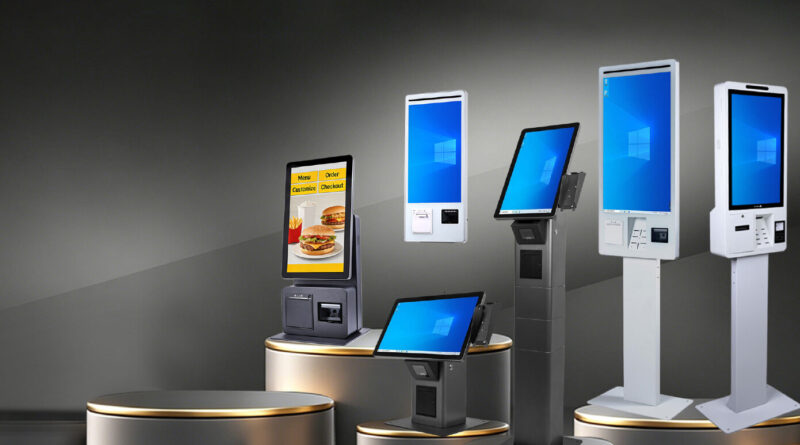
Choosing POS Hardware From a Supplier for Multi-Location Businesses
Managing point-of-sale equipment across multiple locations requires more planning than outfitting a single store. Each branch needs dependable hardware, but the overall system should also remain consistent enough to simplify maintenance, training, and future upgrades.
Working with the right POS Hardware Supplier can help businesses establish a standardized hardware environment across different locations. The goal is to select equipment that meets individual site requirements while maintaining compatibility and consistency throughout the organization.
Prioritize Hardware Standardization
Using similar POS hardware across locations can make day-to-day management considerably easier. Staff can become familiar with the same terminal layouts, peripherals, and basic operating procedures regardless of the branch they work in.
Standardization can also simplify troubleshooting and replacement. If a device needs to be replaced, businesses may have an easier time identifying an equivalent unit without evaluating an entirely different setup.
Consider the Needs of Each Location
Standardization does not mean every location must have exactly the same equipment. Store size, transaction volume, available space, and business activities may differ between branches.
For example, a high-volume location may require additional checkout terminals, while a smaller site may only need a single station. Assess each location before finalizing the hardware configuration.
Confirm Software and Peripheral Compatibility
Multi-location businesses often rely on centralized POS software and connected systems. Hardware should work reliably with the software platform and with peripherals such as barcode scanners, receipt printers, cash drawers, and customer displays.
Before ordering equipment in bulk, verify compatibility requirements and test the proposed configuration. Resolving compatibility problems before deployment can prevent costly interruptions across multiple sites.
Evaluate Durability and Performance
POS hardware in busy locations may operate for long hours and handle thousands of transactions. Equipment should therefore be selected based on expected workload rather than appearance or purchase price alone.
Consider factors such as processing performance, construction quality, display durability, and expected operating lifespan. Hardware that can withstand regular use may provide greater value over time.
Examine Support and Maintenance Options
Supporting several locations can make technical problems more complicated. A supplier should have clear procedures for troubleshooting, warranty claims, repairs, and replacements.
Ask whether support is available remotely and how replacement equipment is handled. A well-defined process can reduce the amount of time a branch remains affected by a hardware issue.
Plan for Inventory and Replacement Units
Multi-location businesses benefit from having a clear strategy for spare equipment and replacement parts. Keeping commonly needed items available can reduce delays when a device fails unexpectedly.
Depending on the size of the organization, it may be useful to maintain a small inventory of compatible terminals, cables, power supplies, scanners, or printers for urgent replacements.
Compare Deployment Requirements
Installing POS hardware across several locations involves more than purchasing devices. Businesses should consider shipping, installation, configuration, network requirements, employee training, and testing.
A phased rollout may be appropriate for larger organizations. Testing the setup at one or two locations first can reveal practical issues before equipment is deployed throughout the entire network.
Think About Future Expansion
A growing business may open additional locations or increase the number of checkout stations at existing branches. POS hardware should be capable of supporting these changes without creating unnecessary compatibility challenges.
Discuss future requirements when evaluating equipment. Choosing widely supported hardware and consistent configurations can make future expansion easier to manage.
Assess the Total Cost
For multi-location businesses, even small differences in hardware costs can become significant when multiplied across dozens of devices. However, the lowest upfront price should not be the only consideration.
Evaluate the complete cost, including hardware, installation, maintenance, warranties, replacement equipment, accessories, and potential downtime. A slightly higher initial investment may make sense if it reduces long-term operational expenses.
Maintain Consistent Documentation
Keeping accurate records for each location can simplify ongoing hardware management. Document the models, configurations, warranties, installation dates, and replacement history of important devices.
Centralized records help businesses identify equipment quickly when troubleshooting or planning upgrades. They can also make it easier to determine which locations may need replacement hardware first.
Final Thoughts
Selecting POS hardware for multiple locations requires a balance between consistency and flexibility. Businesses should look beyond individual devices and consider compatibility, durability, support, deployment, replacement planning, and future growth.
A thoughtful hardware strategy can make POS management more predictable across branches while reducing unnecessary complexity. By evaluating both current requirements and long-term operational needs, multi-location businesses can build a more reliable and manageable POS infrastructure.