
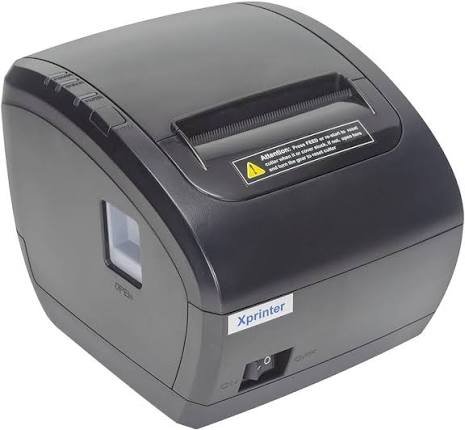
The Importance of Print Speed and Reliability in Xprinter Receipt Printers
Receipt printers are essential components of modern point-of-sale systems, helping businesses generate transaction records, payment confirmations, and customer bills. In busy commercial environments, even small printing delays or unexpected equipment failures can interrupt checkout activities and affect customer satisfaction. For this reason, print speed and operational reliability are two important factors when evaluating receipt printing equipment.
Businesses need printing solutions that can handle their daily transaction volumes while producing clear and consistent results. An Xprinter Receipt Printer can support different commercial applications when its specifications match the requirements of the operating environment. Understanding how printing speed and reliability influence performance can help businesses make better equipment decisions.
1. Why Print Speed Matters in Business Operations
Print speed determines how quickly a receipt printer can produce a document after receiving information from a POS system. In retail stores, restaurants, supermarkets, and other transaction-based businesses, this directly affects the time required to complete customer purchases.
A printer with suitable output speed can help employees finalize transactions without unnecessary waiting. This becomes particularly important during peak periods when multiple customers are waiting to pay.
For example, a supermarket processing numerous purchases throughout the day may benefit from a printer capable of producing receipts quickly and consistently. Similarly, a busy restaurant may need fast printing to generate customer bills and kitchen order tickets without delaying service.
2. The Relationship Between Printing Speed and Customer Experience
Customers generally expect checkout processes to be straightforward and efficient. Although payment authorization and POS software processing also influence transaction time, receipt printing is one of the final steps before a purchase is completed.
Slow printing can create additional waiting time, particularly when several customers are being served. Faster output helps employees complete the process more smoothly and maintain a steady checkout flow.
However, speed should not be considered independently of print quality. A printer must produce readable text, accurate transaction details, and properly aligned content. Businesses should therefore evaluate both output speed and printing clarity when comparing equipment.
3. Supporting High-Volume Transaction Environments
Some businesses process transactions continuously throughout the working day. Supermarkets, convenience stores, transportation counters, and large restaurants may place considerable demands on their receipt printing equipment.
In these environments, the printer must be capable of handling repeated printing tasks without frequent interruptions. Its rated speed, operating cycle, paper-handling mechanism, and thermal management can all influence its suitability for high-volume use.
Businesses should estimate their average and peak transaction volumes before selecting a model. A printer designed for occasional use may not be appropriate for a checkout counter that operates continuously.
4. Understanding the Role of Thermal Printing Technology
Many modern receipt printers use direct thermal printing technology. This process applies controlled heat to specially coated thermal paper, creating text and images without requiring conventional ink or toner.
Thermal printing offers several practical advantages:
- Fast output: The printing process can produce receipts quickly.
- Fewer consumables: There is no need to replace traditional ink cartridges or ribbons.
- Simplified operation: Paper rolls are generally straightforward to install.
- Compact design: Thermal mechanisms can support space-efficient printer configurations.
- Consistent text reproduction: Suitable paper and properly maintained print heads help produce clear receipts.
Despite these advantages, thermal printers still require appropriate paper and routine maintenance. Print quality can deteriorate when the print head becomes dirty or worn.
5. Why Reliability Is Equally Important
Print speed is valuable only when the equipment operates consistently. A fast printer that frequently experiences paper jams, connection failures, or mechanical problems can create more disruption than a slightly slower but dependable alternative.
Reliability refers to the printer’s ability to perform its intended tasks consistently under normal operating conditions. This includes accepting print commands, feeding paper correctly, producing readable receipts, and maintaining stable communication with the POS system.
For businesses, reliable printing helps reduce interruptions, avoid repeated transactions, and maintain an organized checkout process. It also reduces the time employees spend troubleshooting equipment during busy periods.
6. Common Factors That Affect Receipt Printer Reliability
Several technical and environmental factors influence how consistently a receipt printer operates.
Print Head Condition
The thermal print head is responsible for transferring heat to the paper. Dust, residue, and physical wear can affect printing clarity and create uneven output. Regular cleaning according to manufacturer instructions helps maintain performance.
Paper Quality and Compatibility
Using unsuitable or poor-quality thermal paper can lead to faded printing, paper feeding problems, or unnecessary wear. Businesses should use paper that meets the printer’s supported specifications.
Paper Feeding Mechanism
The paper feed system must move the roll smoothly through the printing mechanism. Incorrect paper installation, debris, or worn components may cause jams and inconsistent feeding.
Connectivity Stability
Receipt printers depend on communication with POS terminals, computers, or mobile devices. Loose cables, network interruptions, incorrect drivers, and incompatible settings can prevent print commands from reaching the device.
Operating Environment
Excessive heat, dust, moisture, and unsuitable storage conditions may affect printer components. Installing equipment in an appropriate environment can help maintain consistent operation.
7. The Importance of Connectivity for Reliable Printing
Modern POS systems use different communication interfaces to connect with receipt printers. The available options vary by model and may include USB, serial, Ethernet, Bluetooth, or Wi-Fi.
Each connection type has different practical considerations. USB connections are commonly used for direct computer connections, while Ethernet can support network-based installations. Bluetooth and Wi-Fi may provide flexibility for compatible mobile or wireless POS setups.
Businesses should verify that the selected printer supports the required interface and works with their POS software. Correct installation of drivers and configuration settings is also important for preventing communication problems.
8. Reducing Downtime Through Preventive Maintenance
Unexpected printer failures can interrupt business activities and create additional workload for employees. Preventive maintenance helps identify potential issues before they become serious operational problems.
Useful maintenance practices include:
- Clean the print head and internal areas according to manufacturer guidelines.
- Remove paper dust and debris from the paper path.
- Use compatible thermal paper rolls.
- Check the paper cutter and feed mechanism regularly.
- Inspect cables and network connections.
- Keep the printer away from excessive heat, moisture, and dust.
- Replace damaged or worn components when necessary.
A consistent maintenance routine can help businesses extend equipment service life and reduce avoidable printing interruptions.
9. Balancing Print Speed, Quality, and Operating Costs
Choosing a receipt printer involves balancing several performance factors. Higher printing speed may be useful for businesses with heavy transaction volumes, but it should not be the only purchasing consideration.
Print resolution influences how clearly the printer reproduces text, logos, and other receipt elements. Paper consumption, replacement parts, maintenance requirements, and expected service life also contribute to the overall cost of ownership.
A business with moderate printing needs may not require the highest available speed. Instead, it may benefit from a model that offers an appropriate combination of output quality, stable operation, and manageable maintenance costs.
10. How Businesses Can Evaluate Printer Performance
Before purchasing receipt printing equipment, businesses should assess how it performs under conditions similar to their actual working environment.
A practical evaluation can include:
- Measuring how quickly the printer produces a typical receipt.
- Checking text clarity and alignment.
- Testing repeated printing during periods of continuous operation.
- Verifying compatibility with the intended POS software.
- Checking paper-loading and replacement procedures.
- Testing connectivity and recovery after temporary interruptions.
- Reviewing the manufacturer’s maintenance instructions and technical specifications.
Testing the equipment with the actual transaction workflow can reveal potential issues that may not be apparent from product specifications alone.
Conclusion
Print speed and reliability are essential considerations when selecting receipt printers for commercial use. Faster output can help reduce checkout delays, while dependable operation supports consistent transactions and minimizes unexpected interruptions. Both factors contribute to efficient POS operations across retail, hospitality, transportation, and other industries.
Businesses evaluating Xprinter receipt printers should consider their transaction volume, required printing speed, connectivity, paper compatibility, and maintenance needs. Choosing equipment that balances these factors can support smoother daily operations and provide more consistent printing performance over time.
