
How We Managed Assets Across Multiple Locations
When our team first started handling multiple facilities, keeping track of equipment felt overwhelming. Each location had its own notebook or spreadsheet, and consolidating all the data became a daily struggle. I quickly realized that relying solely on manual methods would create errors and missed maintenance if we didn’t find a more structured approach.
The beginning of our maintenance journey
When I first joined the facilities team, we were managing equipment across four sites with a team of eight technicians. Initially, we relied on Excel spreadsheets to track machines, tools, and maintenance schedules. It was simple and inexpensive, and at first, it seemed like a reasonable solution. We could log maintenance dates, track who was using each asset, and filter by location, which gave us a basic overview of operations.
Early benefits of manual tracking
The spreadsheet allowed us to quickly check the availability of equipment and see which assets needed service. It gave a sense of control and helped coordinate tasks among a small team. For a few months, everything seemed manageable. Technicians could mark completed work, and I could pull basic reports from the data. For a team of our size, the system felt sufficient.
Problems start to surface
Over time, errors began to accumulate. Multiple users editing the spreadsheet caused overwrites and inconsistent data. Some assets were recorded in one location but missing in another. Maintenance schedules were often missed because reminders depended on manual tracking. This experience made me realize the limitations of spreadsheets and the need for a more automated solution.
Looking for accessible alternatives
We started exploring different maintenance management options, particularly solutions that would not require expensive licenses. That’s when we discovered the concept of free CMMS platforms. Our main goal was to find a tool that could centralize records, automate reminders, and be accessible to multiple users without significant cost. This exploration introduced us to the practical advantages of using a free cmms in a real-world setting.
Evaluating features
We focused on platforms that offered automated maintenance scheduling, reporting, and asset tracking without upfront investment. The appeal of a free CMMS was clear: it provided the structure of traditional CMMS software without requiring budget approval. We evaluated different tools, comparing usability, mobile access, and reporting capabilities. Our priority was a system that reduced errors and minimized the time spent reconciling spreadsheets.
Implementation challenges
Transitioning from spreadsheets to a free CMMS was not instantaneous. We had to migrate existing data, train staff, and adapt workflows to ensure proper use of the new system. Early on, some team members were resistant, preferring familiar Excel processes. However, once they saw automated alerts and easy reporting in the free CMMS, adoption accelerated. The system reduced manual tracking and ensured maintenance was completed on time.
Scaling across multiple locations
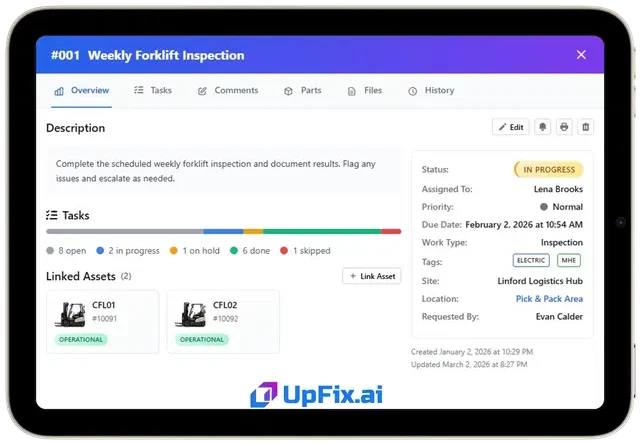
One significant advantage of the free CMMS was multi-location support. Unlike spreadsheets, which became cumbersome when multiple versions existed, the platform allowed all sites to update the same database. Managers could check equipment status in real-time, schedule preventive maintenance, and generate reports instantly. This solved long-standing problems that spreadsheets could not address, highlighting the practical benefits of a free CMMS for teams managing multiple facilities.
Benefits realized after adoption
After a few weeks of consistent use, we noticed several improvements. Missed maintenance tasks decreased significantly. Data accuracy improved because entries were standardized and centralized. The system also allowed us to track the history of each asset, which was particularly valuable during audits or when evaluating equipment replacement. The free CMMS became a reliable part of our daily workflow, reducing errors and freeing up time for other responsibilities.
User experience and accessibility
The team appreciated the intuitive interface of the free CMMS. Technicians could log work from their mobile devices, and managers could track asset performance remotely. This eliminated the need to constantly check spreadsheets or follow up manually. The platform’s accessibility demonstrated that effective maintenance management does not require expensive software; a free CMMS can provide essential functionality for small to medium-sized teams.
Lessons learned from transition
One key takeaway is the importance of adopting tools that match operational needs and team size. Excel was sufficient for initial organization, but as the number of assets and locations increased, the limitations became clear. Introducing a free CMMS allowed us to scale efficiently without increasing cost. The structured system reduced human error, improved workflow consistency, and made maintenance management far more reliable.
Conclusion
Our experience managing maintenance across multiple sites showed that spreadsheets are useful for small teams, but they have clear limitations. A free CMMS can automate scheduling, centralize records, and provide real-time visibility, all without requiring significant financial investment. By starting with spreadsheets and transitioning to a free CMMS, we improved data accuracy, reduced missed maintenance, and created a more efficient workflow for our team. For any team managing multiple assets or locations, exploring free CMMS platforms is a practical step toward long-term operational efficiency.

